> ## Documentation Index
> Fetch the complete documentation index at: https://docs.voicebot.studio/llms.txt
> Use this file to discover all available pages before exploring further.
# Architecture Overview
> Understanding how VoiceBot processes and handles voice interactions
VoiceBot's architecture is designed to provide fast, reliable, and scalable voice AI interactions.
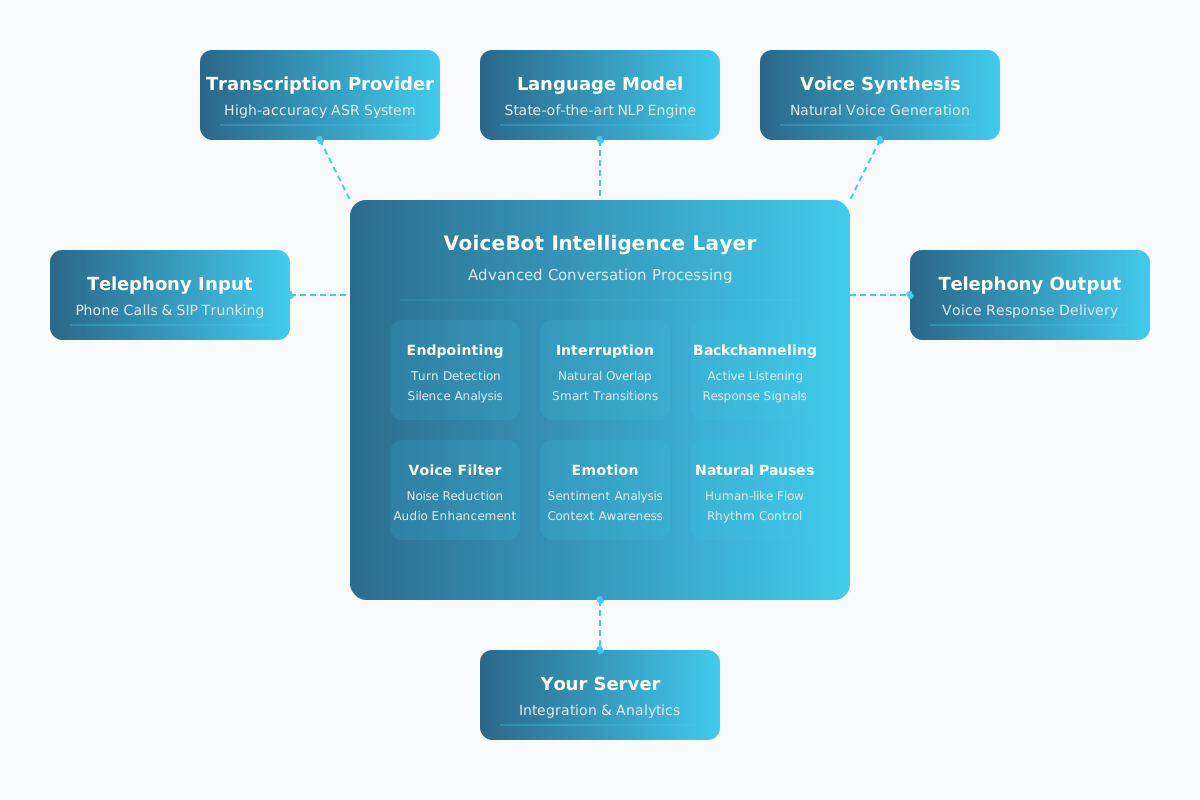 ## Key Components
### 1. Voice Processing Engine
* Real-time voice-to-text conversion
* Noise cancellation and audio enhancement
* Multi-language support
* Intent recognition
* Entity extraction
* Context management
### 2. Workflow Engine
* Drag-and-drop interface
* Conditional logic handling
* State management
* Real-time workflow processing
* Dynamic context updates
* Error handling and recovery
### 3. Integration Layer
* RESTful API endpoints
* Authentication and authorization
* Rate limiting and throttling
* Pre-built connectors
* Custom integration support
* Data transformation
### 4. Analytics Engine
* Voice quality metrics
* Response times
* Error rates
* User engagement metrics
* Conversation flow analysis
* Success rate tracking
## Data Flow
* User's voice input is captured
* Audio is processed and enhanced
* Speech is converted to text
* Text is analyzed for intent
* Entities are extracted
* Context is applied
* Appropriate workflow is triggered
* Business logic is executed
* External services are called if needed
* Response is generated based on workflow
* Text is converted to speech
* Voice response is delivered to user
## Security & Performance
* End-to-end encryption for all voice data
* Role-based access control (RBAC)
* Regular security audits
* Industry standard compliance
* Sub-second response times
* High concurrent user load
* Minimal latency
* Automatic scaling
Now that you understand our architecture, check out our [pricing plans](pricing) to get started with VoiceBot.
## Key Components
### 1. Voice Processing Engine
* Real-time voice-to-text conversion
* Noise cancellation and audio enhancement
* Multi-language support
* Intent recognition
* Entity extraction
* Context management
### 2. Workflow Engine
* Drag-and-drop interface
* Conditional logic handling
* State management
* Real-time workflow processing
* Dynamic context updates
* Error handling and recovery
### 3. Integration Layer
* RESTful API endpoints
* Authentication and authorization
* Rate limiting and throttling
* Pre-built connectors
* Custom integration support
* Data transformation
### 4. Analytics Engine
* Voice quality metrics
* Response times
* Error rates
* User engagement metrics
* Conversation flow analysis
* Success rate tracking
## Data Flow
* User's voice input is captured
* Audio is processed and enhanced
* Speech is converted to text
* Text is analyzed for intent
* Entities are extracted
* Context is applied
* Appropriate workflow is triggered
* Business logic is executed
* External services are called if needed
* Response is generated based on workflow
* Text is converted to speech
* Voice response is delivered to user
## Security & Performance
* End-to-end encryption for all voice data
* Role-based access control (RBAC)
* Regular security audits
* Industry standard compliance
* Sub-second response times
* High concurrent user load
* Minimal latency
* Automatic scaling
Now that you understand our architecture, check out our [pricing plans](pricing) to get started with VoiceBot.